
Employees and availability
Create Work Patterns and set anchor dates
Create repeating work/rest cycles, decide whether they repeat, and use optional shift rotation only when a pattern should follow specific Shift Templates.
1. What a Work Pattern controls
A Work Pattern defines working days and rest days for an employee. Once the pattern has a First working day, Auto-Assign uses that cycle to decide which dates are working days and which are rest days.
For employees with an active anchored Work Pattern, the pattern controls the work/rest cycle. Normal leave, Days off, shift preferences, locations, rest between shifts and other eligibility rules still apply.
2. Create a Work Pattern
- 1.Open Settings → Schedules & Templates.
- 2.In Work Patterns, select New work pattern.
- 3.Enter the number of working days and minimum rest days.
- 4.Leave Repeat continuously on for an ongoing repeating schedule. Turn it off only when the pattern should run for one cycle and then stop.
- 5.Add Shift Templates to the rotation only when the employee should follow specific named shifts in a fixed order.
- 6.Save the pattern.
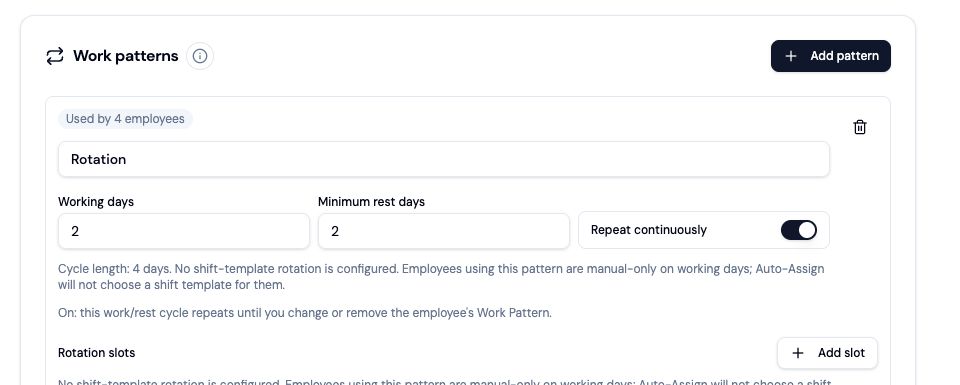
3. No shift rotation means flexible shifts on working days
A Work Pattern does not need a shift rotation. With no rotation, the pattern still controls working and rest days, while Auto-Assign can choose any Shift Template that the employee is otherwise allowed to work.
If you add a rotation, the employee follows those Shift Templates in the configured order on pattern working days.
4. Assign the pattern and First working day
- 1.Open Settings → Employee profiles and select the employee.
- 2.Choose the Work Pattern.
- 3.Set First working day. This is day 1 of that employee's work block.
- 4.Use the preview to check upcoming working and rest days before running Auto-Assign.
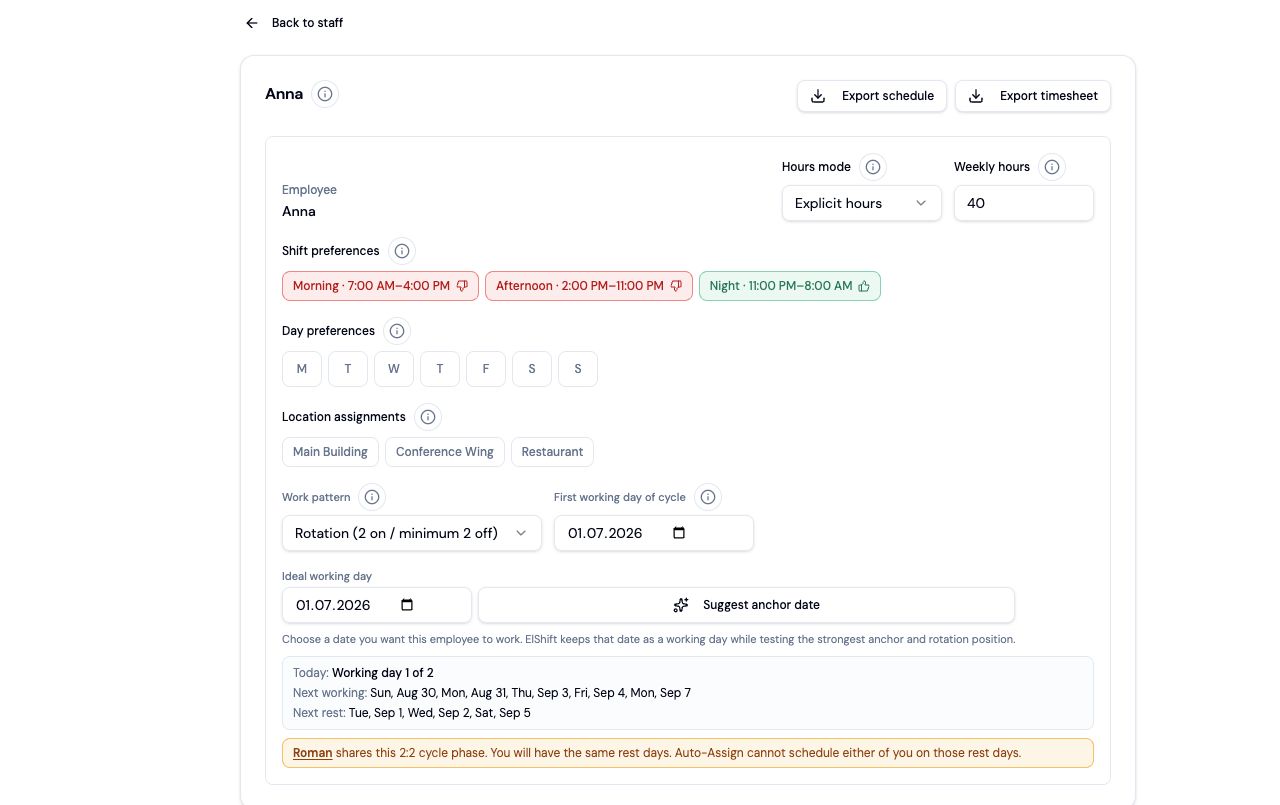
Changing First working day moves the employee to a different position in the cycle. Employees on the same pattern do not need the same First working day.
5. Overnight shifts use their start date
For Work Pattern eligibility, an overnight shift belongs to the date on which it starts. A Night shift can therefore start on the employee's final working day and finish the next morning even when that next date is a pattern rest day.
6. Leave shift rotation empty when the pattern is day-only
An empty Shift Template rotation means the Work Pattern controls working and rest days only. On a working day, Auto-Assign may use any otherwise eligible Shift Template.
When you configure an explicit Shift Template rotation, that rotation remains strict. Pattern rest days always remain unavailable for Auto-Assign.