
Employees and availability
Manage employee work preferences
Set employee hours, day, shift and location preferences, and review preference-change requests from employees.
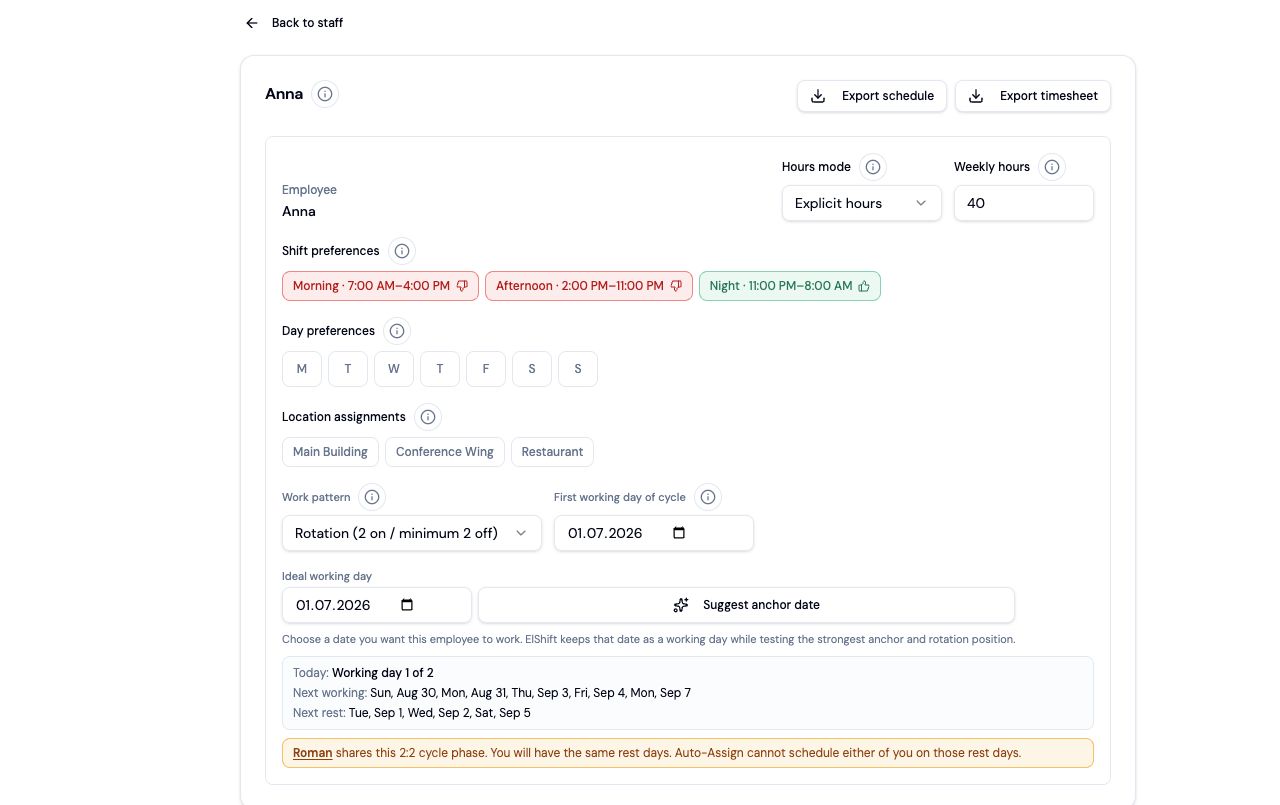
1. Open Work Preferences
- 1.Open Settings → Employee profiles.
- 2.Select the employee.
- 3.Review weekly hours, day preferences, shift preferences and location preferences where Locations is enabled.
2. Understand liked, disliked and neutral choices
Liked choices help Auto-Assign prefer an employee when several people are otherwise suitable. Disliked weekdays or Shift Templates stop Auto-Assign from using that option for the employee. Neutral leaves the option available without giving it extra preference.
Location preferences work the same way. If at least one location is liked, Auto-Assign keeps the employee within that liked set; disliked locations are not used for that employee.
3. Review employee preference requests in Actions
Employees can request changes to weekly hours, weekdays, Shift Templates and locations from Employee Hub or Mobile. A pending request does not change scheduling until a manager approves it.
Open Actions → Preference Requests to compare the current settings with the requested settings, then approve or reject the request.
If a manager changed the employee's settings after the request was submitted, ElShift will not overwrite those newer values automatically. Review the current settings and ask the employee to submit an updated request if needed.
4. Work Patterns and Days off stay manager-controlled
Employees cannot change their Work Pattern, anchor date or manager-set Days off through a preference request. Those settings remain in the employee profile for managers to control directly.